



September 16, 2026

September 18, 2025
September 10, 2025
July 3, 2025
Demat Holding Statement: How to Download, Read and Verify Your Holdings

Author
Shoonya Team
How do you check whether the shares you’ve purchased are reflected in your Demat account?
A demat holding statement provides a record of the securities held in your account on a particular date.
Whether you want to verify your holdings or understand the details shown in the report, knowing how to access and read this statement can be useful.
Here’s how it works.
What Is a Demat Account Holding Statement?
A demat account holding statement is a record of the securities held in your Demat account as of a particular date.
Depending on what you hold, the statement may include shares, mutual fund units, bonds and other securities maintained electronically in the account.
What Information Does a Demat Holding Statement Show?
The exact fields can differ depending on the DP or report format, but a statement of demat holdings may contain information such as:
- ISIN
- Security name
- Quantity held
- DP holding
- Total holding
- Market rate
- Holding value
- Pledged or collateral securities
- Buy average, where provided
- Other account or security-related details
How to Get Demat Account Holding Statement
There are generally two routes:
- Through your Depository Participant
- Through the relevant central depository, such as CDSL or NSDL
For Shoonya users, the statement can be accessed through the Shoonya Back Office. The existing process is given below.
How to Download Demat Holding Statement from Shoonya
You can check your Demat holding statement on Shoonya through your online Demat account.
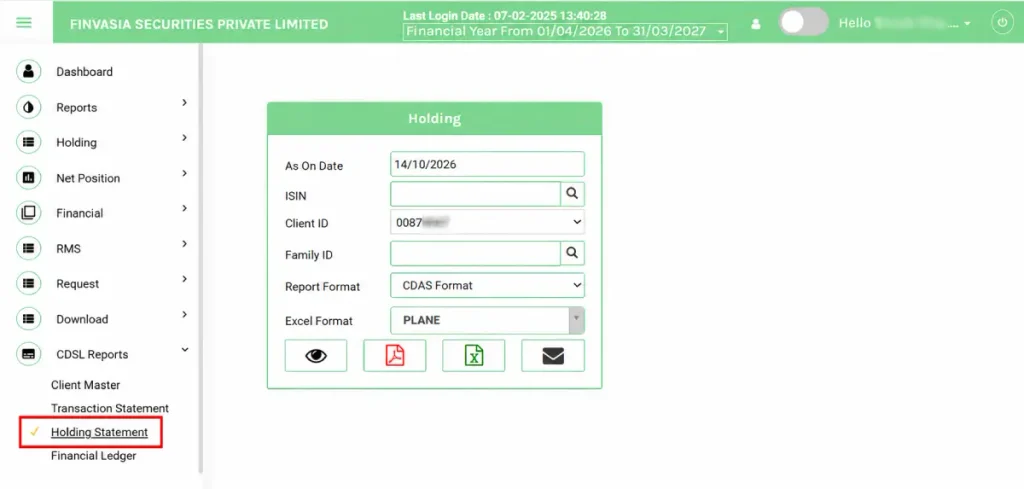
- Step 1: First, you must log in to the Back Office portal, reports.shoonya.com/, to access any reports.
- Step 2: Once you are logged in, you need to click on the CDSL reports mentioned at the bottom left. From the menu, click the third option, holdings statements.
- Step 3: Choose the time period for the statement – monthly, quarterly, or yearly.
- Step 4: Enter your client ID (digit demat account number/beneficiary ID), for example, 0011****.
- Step 5: Click on the PDF/Excel logo to download the statement.
The statement will be saved to your device.
How to Download Demat Holding Statement from CDSL
You can also access your Demat account statement directly through CDSL.
The existing process is:
- Begin by visiting the CDSL website.
- Enter your PAN Card Number.
- Provide your BO ID and Date of Birth.
- Verify the CAPTCHA.
- Enter the OTP received using your registered mobile number.
- Click on Submit.
Your BO ID is the Beneficial Owner identification number linked to your Demat account.
What Is an NSDL Demat Holding Statement?
An NSDL demat holding statement is a holding statement for a Demat account maintained through a Depository Participant connected with NSDL.
Investors can generally access their Demat records through their DP or the applicable NSDL investor facility, depending on how their account is maintained.
Before trying to download a statement directly from a depository, check whether your Demat account is held with CDSL or NSDL.
How to Read a Demat Holding Statement
Here are some of the common fields:
1. ISIN
ISIN stands for International Securities Identification Number. It is a unique identification code assigned to a security.
2. Security Name
This tells you the name of the company, bond or other security appearing in your account.
3. DP Holding
DP Holding reflects securities shown under the relevant DP holding field in the statement.
4. Total Holding
This shows the total quantity of the particular security reflected in the account.
5. Rate
This shows the market rate used in the statement for the security.
6. VAR %
VAR stands for Value at Risk. Where displayed, it represents the risk percentage applied for the relevant calculation.
7. Holding Value
The holding value represents the value of the securities shown in the statement.
8. Margin Pledge Value
This reflects securities pledged as margin, where applicable.
9. Notional P&L
Notional profit or loss represents the unrealised profit or loss shown against the holding.
10. Buy Average
This is the average purchase price shown for the security.
Reading Demat Account Statement with an Example
As you can see in the image, the demat account statement shows the following figures for the holding:
- ISIN: INE040H01021
- Security Name: SUZLON
- DP Holding: 1.000
- Total Holding: 1.000
- Rate: 49.90
- VAR %: 100.00
- Margin Pledge Value: 0.00
- Holding Value: 49.90
- Value After VAR: 0.00
- Collateral: 0.00
- Buy Avg: 25.50
- Notional PNL: 24.40
Reading your demat holding statement:
- ISIN (International Securities Identification Number): INE040H01021 is the unique international code that identifies this specific security. In this example, it refers to Suzlon Energy Limited.
- Security Name: SUZLON is the ticker or name of the company you have invested in.
- DP Holding and Total Holding: This shows you hold 1 share (displayed as 1.000 for system formatting) of Suzlon, fully settled and credited to your account.
- Rate: 49.90 is the current market price per share of Suzlon on the date the statement was generated.
- VAR % (Value at Risk Percentage): 100% represents the risk percentage applied to the stock for margin and risk tracking purposes.
- Holding Value: 49.90 reflects the total current market worth of your holding (1 share × ₹49.90 market rate).
- Value After VAR: 0.00 reflects your holding value after subtracting the VAR amount. A 100% VAR reduces this specific risk-adjusted value to zero.
- Collateral & Margin Pledge Value: 0.00 indicates that none of your shares have been pledged to your broker as collateral or for extra trading margin.
- Buy Avg (Average Purchase Price): 25.50 is the average price per share you originally paid to purchase this Suzlon stock.
- Notional PNL: 24.40 represents your unrealised profit. It is calculated by taking your current market price per share (₹49.90) and subtracting your buy average price per share (₹25.50).
Note: In your holding statement dashboard, the Holding Value and Notional PNL fields reflect the calculations relative to your total net share balance.
Demat Holding Statement vs Transaction Statement
A holding statement and transaction statement serve different purposes.
| Basis | Holding Statement | Transaction Statement |
|---|---|---|
| Shows | Securities currently held | Transactions during a period |
| Purpose | Check current holdings | Track credits, debits and transfers |
| Time reference | Position as of a particular date | Activity over a selected period |
| Useful for | Verifying ownership and quantity | Reviewing Demat account activity |
If you only want to know what you currently own, the holding statement is usually the more relevant document.
Why Is a Demat Holding Statement Important?
A Demat holding statement can be useful for several reasons:
- Proof of holdings: It provides a record of securities held in the account.
- Portfolio tracking: It helps you review your current Demat holdings.
- Transaction verification: You can check whether securities have been correctly credited or debited.
- Record keeping: It can be useful when maintaining investment records.
- Tax documentation: Demat records may help while reviewing investment transactions for tax-related reporting.
Demat Account Holding Statement vs CAS
A demat account holding statement generally focuses on securities held in a particular Demat account.
A Consolidated Account Statement (CAS) provides a broader consolidated view of eligible investments linked to the investor across participating depository and mutual fund records.
So, if you want information about one Demat account, a holding statement may be enough. If you want a broader consolidated investment view, CAS may be more useful.
Demat Account Holding Statement : FAQs
What is a demat account holding statement?
A demat account holding statement is a record showing the securities held in your Demat account as of a particular date.
How to get a demat account holding statement?
You can generally get it through your Depository Participant or the relevant depository. Shoonya users can download the statement through the Back Office portal.
What is a DP holding statement?
A DP holding statement is a report available through your Depository Participant showing the securities maintained in your Demat account.
What does demat holding mean?
Demat holding means the securities currently held electronically in your Demat account.
Can I download a demat holding statement online?
Yes. A demat account holding statement download can generally be done through your DP or the relevant depository’s online facility.
Is a holding statement the same as a transaction statement?
No. A holding statement shows securities held as of a particular date, while a transaction statement shows credits, debits and other Demat account activity over a specified period.
Can I get a statement of demat holdings from CDSL or NSDL?
Yes, depending on which depository your Demat account is linked to, you may be able to access your statement of demat holdings through CDSL, NSDL or your Depository Participant.
What is an NSDL demat holding statement?
An NSDL demat holding statement shows securities held in a Demat account maintained through an NSDL-linked Depository Participant.


Explore Our Offerings

Stocks
Trade equities across NSE and BSE with zero delivery charges. Invest, hold or sell with a seamless experience.


Future & Options
Execute complex strategies with simple tools and real-time data.

IPOs
Apply to the latest IPOs in just a few taps. Stay updated and capture opportunities as they open.